Dienst up- of downgraden
Through My Hosting you can quickly and easily upgrade or downgrade your hosting service degrees to another package.
Up- of downgraden
- Log in to My Hosting with your username and password.
- Go to “Services” and click on “My Services”.
- Klik op het abonnement dat je wilt upgraden.
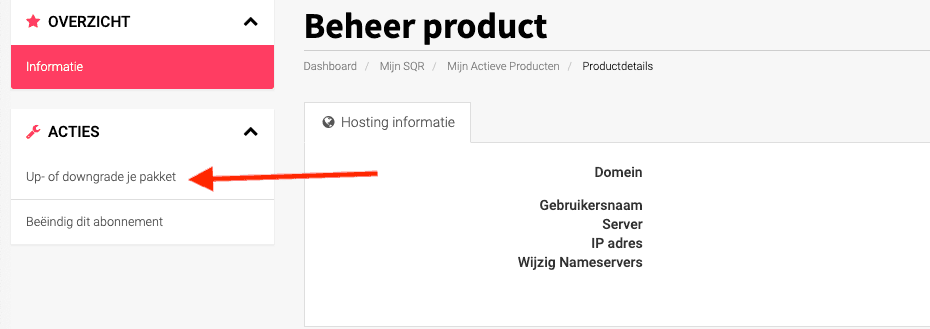
- The option ‘Upgrade or downgrade your package‘ will now appear in the left-hand menu:

- Once you have clicked on this, an overview will appear with all the options you can upgrade or downgrade to. Choose the desired package.
- Follow the steps in the shopping cart; the costs for the overlapping period will be settled.
- After the order is completed, the change to your subscription will be active immediately.
PLEASE NOTE!
Once you have performed the upgrade or downgrade, it will take effect immediately.
In the case of an upgrade, this means that you immediately have more capacity and can continue building a website (upgrade: email to web hosting) or expanding your website(s) (upgrade: to a larger web hosting subscription).
In the case of a downgrade, this means that you also immediately have less capacity and functionality. So, if you go from web hosting to email hosting, your website will also go offline because the PHP and other website functions are disabled. Your website files will still exist, but the website will no longer be online.